
Chromatography software can produce an accepted liquid-GC result, but that result is often only the start of a PVT lab deliverable. Before it reaches an engineer or external client, the lab may still need to normalize the composition, apply the agreed internal-standard assumptions, check component names, combine liquid and gas results, and present the outcome in a reviewable format.
GC Reader now accepts Chromperfect ZED files in its Liquid GC workflow and exports a standalone .xlsx composition report. The purpose is not to replace Chromperfect. Chromperfect remains where the laboratory controls method setup, calibration, peak integration, and release of the chromatographic result. GC Reader starts after that accepted result, when the task becomes a controlled composition and reporting workflow.
What is a Chromperfect ZED file?
Chromperfect documents a ZED source file created by its Traffic program from a configured Format file for use by Natural Gas Reporter. That makes the export layout relevant to compatibility; a .ZED extension alone does not establish that every configured file will match GC Reader. GC Reader uses supported ZED exports as inputs to its Liquid GC workflow after laboratory acceptance. See Chromperfect’s Natural Gas Reporter documentation.
From an accepted ZED result to a PVT deliverable
Chromperfect already provides chromatography reporting, including customized PDF and Excel reports. GC Reader is an optional downstream workflow for laboratories that need its supported liquid-composition processing, component mapping, gas/liquid recombination, and XLSX review structure. It is not a claim that Chromperfect cannot produce professional reports.
In a black-oil PVT workflow, the final recipient usually needs more than a raw export. A reservoir-fluid engineer needs a clear liquid composition basis. A lab supervisor needs to know which source file and processing settings were used. A client reviewer needs a report that does not expose a workstation path or force them to reverse-engineer a technician’s spreadsheet.
That gap is where manual workbooks tend to grow: one copy-paste step for a composition table, another for internal-standard adjustments, a separate tab for GOR recombination, and a final report assembled differently for each request. The risk is not only speed. It is losing the link between the delivered table and the accepted source result.
Product boundary
GC Reader does not change the chromatographic method or silently decide peak assignments. It gives the lab a repeatable downstream path from an accepted Chromperfect ZED liquid-GC export to a composition report that can be reviewed, delivered, and used in engineering handoff.
Load Chromperfect ZED files in the Liquid GC workflow
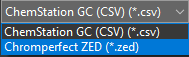
When selecting a Liquid GC source file, the analyst can choose either the existing ChemStation CSV path or a Chromperfect ZED file. The ZED file enters the same controlled Liquid GC workflow used for composition processing. This keeps the operational decision simple: choose the actual export format, then review the liquid analysis with the lab’s agreed rules.
For the liquid composition step, GC Reader supports the same practical controls used in the rest of the product: internal-standard normalization where the workflow requires it, editable component aliases for laboratory naming differences, and visible output tables for review. It does not assume that every laboratory label is already a valid reporting component. Unknown names can be identified and mapped deliberately rather than being lost in an ad hoc spreadsheet cleanup.
From accepted liquid analysis to an engineering composition
- Accept the chromatographic result in Chromperfect. Method control, calibration, integration decisions, and laboratory QA remain with the chromatography workflow.
- Load the ZED file into GC Reader. Select the Chromperfect ZED input type in the Liquid GC workflow.
- Review the composition basis. Apply the agreed ISD settings when applicable, review aliases, and confirm the resulting liquid composition table.
- Recombine only when the project requires it. For a wellstream deliverable, GC Reader can combine the final gas and liquid compositions using the project GOR and oil-density inputs. Review the gas-liquid GC recombination checklist before accepting the reporting basis.
- Export the report depth the recipient needs. Generate a concise client-facing report or include the detailed composition and audit appendix for internal review.
This is intentionally a lab workflow, not a claim that every ZED file should be processed identically. The correct ISD basis, component aliases, GOR, and report layout remain project decisions that a qualified analyst can see and review.
What the XLSX report contains
Liquid-composition review and recombination are different tasks. A supported ZED export can be processed and reviewed in the Liquid GC workflow without treating it as a recombined wellstream result. The current XLSX exporter, however, does not provide a separate liquid-only report mode.
Current workbook structure. The exporter creates Summary, Recombined_Composition, and Metadata. Selecting detailed composition adds Gas_Composition, Liquid_Composition, and CnPlus_Properties; selecting the audit option adds Processing_Log and Processed_Input_Data. These options control report depth, not whether the project requires recombination.
When recombination is required, review the accepted gas and liquid results, GOR, oil-density basis, and calculated composition before delivering the report. The presence of a Recombined_Composition worksheet alone does not establish a valid recombined result. For a liquid-only deliverable, confirm the required layout with KYCIS during the sample-file review rather than assuming the exporter automatically removes unrelated worksheets.
What the report makes visible
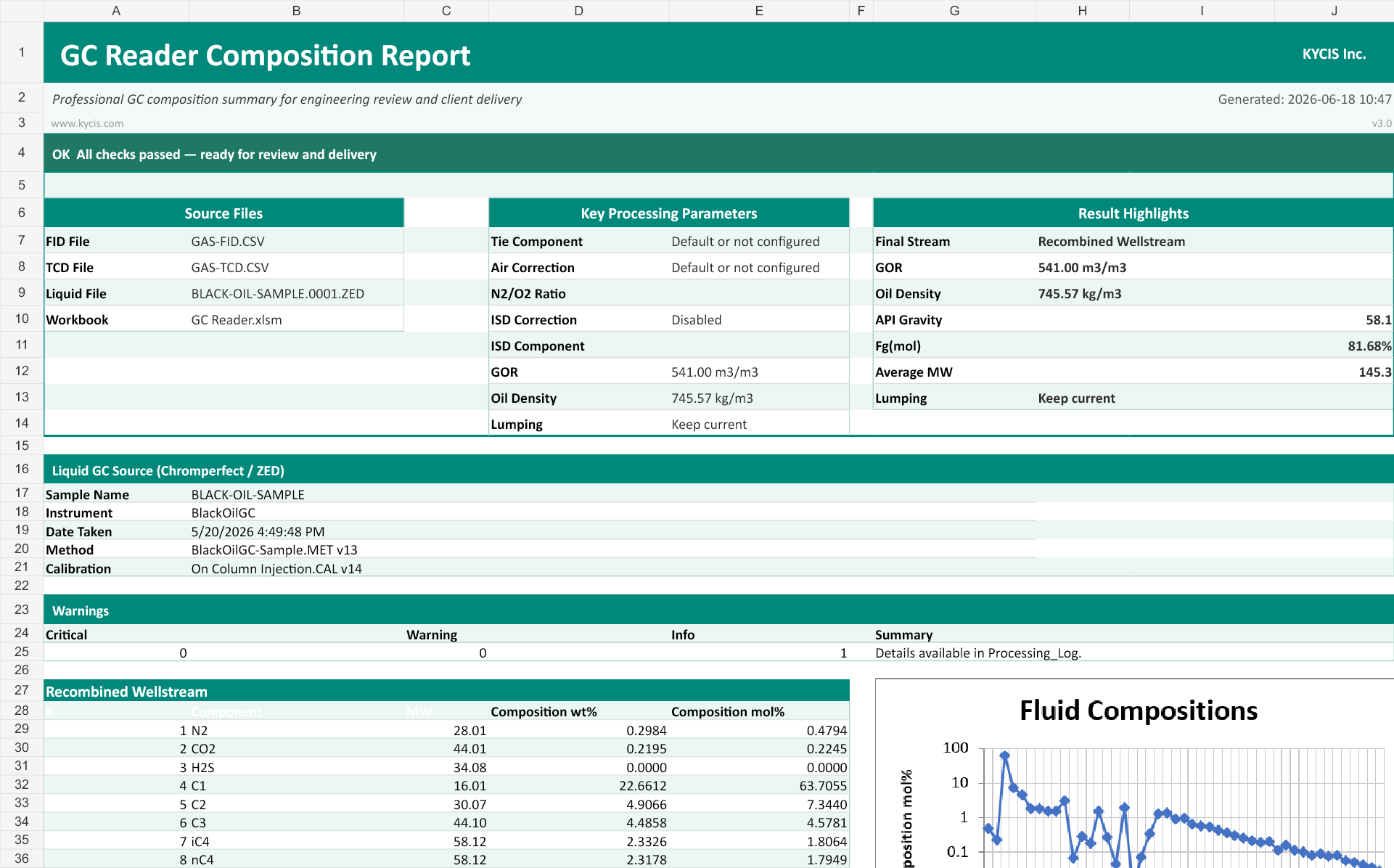
A professional report is not simply a composition table with a logo. It should answer the questions a reviewer will ask without sending them back to the technician: Which files were used? Was ISD correction enabled? If recombination was performed, which GOR and oil density were applied? Are there warnings that require a review? What does the final composition look like?
GC Reader records those decisions in the report structure. The Summary is designed for delivery and engineering review; Metadata retains source and report information; the optional Processing Log captures full paths, settings, alias corrections, and warnings for internal traceability. The report is therefore a controlled handoff rather than an unlabelled spreadsheet tab.
Common handoff failures this workflow is designed to expose
Most reporting problems are not dramatic calculation failures. They are quiet mismatches that arrive late: a component name that is different from the reporting basis, an ISD assumption that is known by one technician but absent from the deliverable, a recombination input copied from an earlier sample, or a result that cannot be linked back to the source export. These are exactly the cases where a polished-looking spreadsheet can still be difficult to defend.
GC Reader does not eliminate the need for technical judgement. It makes the decisions visible. The source-file panel identifies the input files by name. The processing-parameter panel makes the gas and liquid settings visible, together with the GOR, oil-density, and lumping choices when reviewing a recombined result. Warning status tells the recipient whether a technical review is needed before the report is treated as final. Where a lab needs a deeper record, the optional Processing Log records the settings and alias corrections instead of leaving them only in a technician’s working workbook.
That visibility is useful for recurring work because it lets a supervisor review the same structure each time. It is equally useful for one-off studies because the receiving engineer can ask a focused question about a documented input rather than request that the lab reconstruct the entire workflow.
Choose the report depth for the actual recipient
Not every delivery should contain every internal worksheet. A client may only need a concise summary and the recombined composition. An engineering team may need the dedicated gas and liquid composition sheets with Cn+ properties. A lab manager resolving a discrepancy may need the audit appendix with processed input data and the processing log.
The report options are therefore a delivery control, not a cosmetic choice. The same calculation path can produce a clean external handoff or the internal evidence needed to review it. This avoids maintaining separate report templates that slowly diverge from each other as a workflow changes.
Where this fits in a PVT lab workflow
Chromperfect ZED support is particularly relevant where liquid GC data is part of a black-oil or recombination workflow. The liquid composition can be reviewed in the Liquid GC workflow. When the project requires recombination, accepted gas and liquid results can be combined using the project GOR and oil-density basis. The current XLSX exporter uses the workbook structure described above; this article does not promise a separate liquid-only report layout. The final composition can then move into reservoir-fluid, EOS, dew-point, or other engineering calculations as appropriate.
For the wider data path from a chromatograph export to an engineering deliverable, see our practical composition workflow for PVT labs. Teams working with recurring deliverables may also find the guidance on automating GC composition reports useful. The product page has the full GC Reader capability and qualification overview.
Test the workflow with a representative ZED file
Use the GC Reader sample-file review form to describe your ZED export, the required report layout, and whether the task is liquid-composition review or gas/liquid recombination. KYCIS will review compatibility and reporting scope before proposing a trial.
Do not upload or paste confidential laboratory data into the form. After the initial review, KYCIS will provide transfer instructions for a representative ZED file with sensitive identifiers removed and, where available, a redacted example of the required report. A liquid-only report requirement should be checked explicitly against the current exporter rather than assumed to be a separate supported mode.
Frequently asked questions
Does GC Reader replace Chromperfect?
No. Chromperfect remains the chromatography environment for method operation, calibration, integration, and laboratory acceptance. GC Reader processes an accepted export into a controlled composition and reporting workflow.
Can a ZED file be used for gas and liquid recombination?
A ZED file is supported in the Liquid GC workflow. When a project also has an accepted gas composition, GC Reader can combine the final gas and liquid compositions using a user-supplied GOR and oil density.
Can the exported report include audit information?
Yes. The export can be kept concise for client delivery or expanded with detailed composition sheets, Cn+ properties, a processing log, processed input data, and metadata for technical review.