
GC Reader
GC Reader for ChemStation and Chromperfect GC reporting.
Gas GC · Liquid GC · GOR recombination · XLSX reports · optional Phase Envelope
GC Reader 4.0 turns accepted ChemStation CSV exports and Chromperfect ZED liquid files into reviewed gas, liquid, and recombined wellstream composition reports. Professional XLSX reports remain the core deliverable, while an optional KYCIS API Phase Envelope workflow can run after recombination to provide a P–T envelope and key phase points for engineering review.
Chromperfect ZED support applies to Liquid GC input. GC Reader starts after result acceptance; it does not replace the CDS, peak integration, calibration, or laboratory QA.
The lab problem
GC systems give you chromatogram exports. Engineering teams need defensible composition reports.
Raw GC exports are rarely the final deliverable. PVT labs still have to merge detector channels, correct air contamination, map component names, normalize results, recombine gas and liquid analyses, and package a report that another engineer can review. GC Reader is built for that handoff, including ChemStation CSV files and Chromperfect ZED files used in black-oil Liquid GC work.
Reduce manual spreadsheet risk
Replace repeated copy-paste, tie-factor calculations, and component-name cleanup with a controlled workbook workflow.
Keep chromatographer control
Methods, tie components, ISD parameters, aliases, reporting groups, and plus-fraction assumptions remain visible and adjustable.
Standardize recurring reports
Use the same parsing and normalization rules across repeated PVT studies, gas QC runs, and engineering handoffs.
Workflow
From GC export to composition report.
GC Reader is a standalone lab product for turning GC data into usable composition deliverables. ChemStation CSV files feed the existing gas and liquid workflows, while Chromperfect ZED files can be loaded into the Liquid GC workflow for black-oil GC analysis. Cleaned compositions can then be exported as an XLSX report workbook or used in downstream EOS, dew-point, PVT, or reporting workflows.
Fully controllable: every merge rule, normalization parameter, alias, and reporting group can be edited per project.
Use cases
Where GC Reader fits.
PVT lab reporting
Produce consistent gas, liquid, and recombined wellstream composition tables for reservoir-fluid studies, separator samples, and EOS handoff packages.
Gas lab quality control
Standardize detector merge, air correction, normalization, component alias rules, and reporting-component grouping across recurring gas chromatography methods.
Engineering composition handoff
Convert lab exports into mol% and wt% tables that reservoir, process, and flow-assurance engineers can use without reformatting.
Recurring report automation
Reduce repeated manual workbook preparation when the same GC method, component list, or report pack is produced every week or month.
Software screenshots
See the workflow screens.
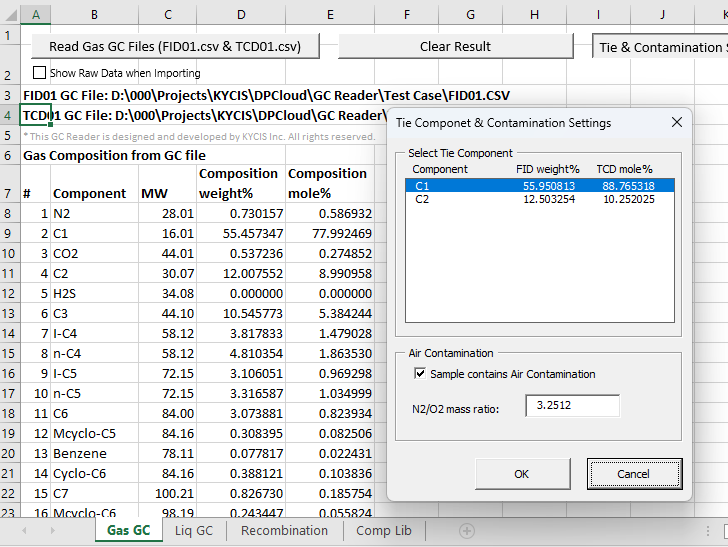
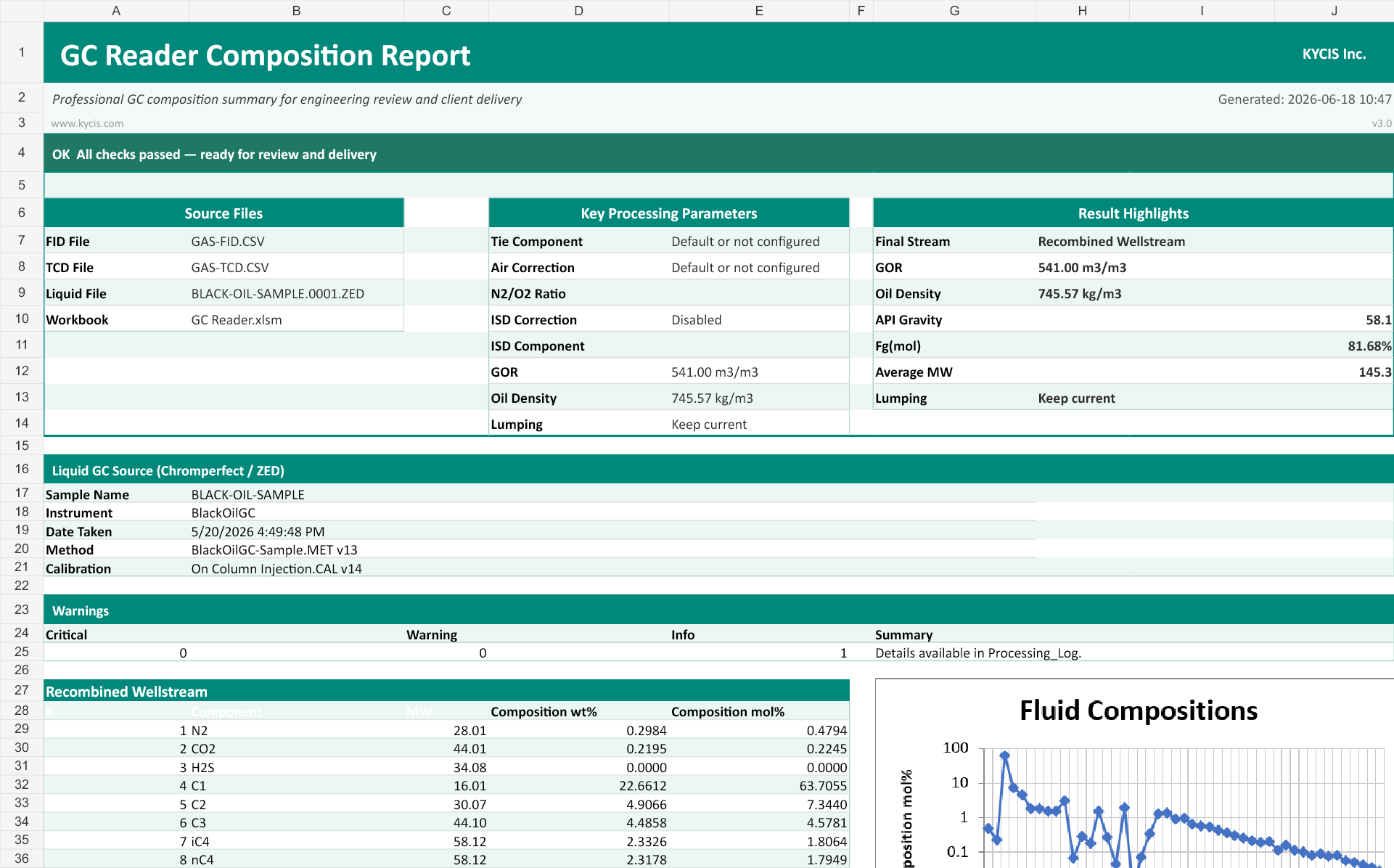
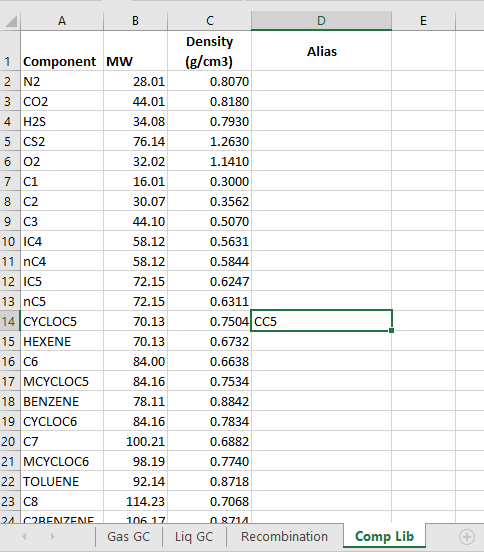
The interface is organized around the same lab workflow: gas GC merge, liquid GC normalization, Chromperfect ZED import for black-oil Liquid GC work, GOR recombination, XLSX report export, and the editable component library.
Report evidence
Deliver a workbook another reviewer can inspect.
GC Reader exports a standalone XLSX workbook rather than leaving the final result inside an analyst’s working spreadsheet. The report depth can be matched to a client handoff or an internal technical review.
Minimum report
Summary, Recombined Composition, and Metadata sheets retain the delivered wellstream result, report status, project basis, and source context.
Optional review evidence
Gas and liquid compositions, Cn+ properties, processed inputs, raw source data, warnings, and detailed processing information can be included when the review requires them. If Detailed Processing Data is selected and a Phase Envelope has been generated, the report also includes a Phase_Envelope sheet.
Worked example
Inspect a gas–liquid recombination example.
Follow three synthetic CSV inputs through FID/TCD consolidation, liquid normalization and GOR recombination into a seven-sheet Excel report with a DPCloud-calculated phase envelope. Compare the input amounts, calculation basis and resulting compositions before discussing your own laboratory workflow.
Inside the example pack
- Three synthetic CSV inputs: FID, TCD and liquid
- GC Reader-generated XLSX results, phase-envelope points and chart, with example labels and layout adjustments
- Reproduction steps, reference values and calculation limits
39 KB ZIP · No email required · GC Reader application not included
A basis you can check
- Tie component
- C2, the sole shared component
- GOR
- 100 m3/m3; gas at 15 °C and 101.325 kPa
- Liquid density
- 750 kg/m3, an assumed example value
- Review checks
- Gas, liquid and recombined compositions checked against an independent calculation
Phase-envelope generation is optional and is currently provided as a pilot feature. Its availability may depend on product version or licensing.
Need to assess your own export? Request a sample-file review. Describe the format and report layout first; do not submit confidential laboratory data in the form.
Related workflow: Gas–liquid recombination checklist for PVT labs.
Optional phase behavior review
Phase Envelope from the recombined wellstream.
After gas–liquid recombination, GC Reader 4.0 can use the displayed wellstream composition to generate a P–T phase envelope and special phase points through the KYCIS API. This is an optional quality-control and engineering-review step; professional composition reports remain the primary deliverable.
KYCIS API access
Phase Envelope calculation requires a configured API Base URL and API Key. Contact KYCIS to obtain the API key and configuration guidance.
Report inclusion when available
With Detailed Processing Data selected, a successful calculation adds a Phase_Envelope report sheet with special points, calculation time and message, envelope point data, and a P–T chart. If no calculation has been generated, the sheet is not included.
Capabilities
Core modules.
Gas composition analysis
Reads FID and TCD detector exports, merges them through a configurable tie component, applies optional air correction, and outputs normalized gas composition tables.
Liquid composition analysis
Supports internal-standard liquid GC workflows with editable ISD component, sample weight, purity, and heavy-fraction assumptions up to C30+.
Chromperfect ZED import
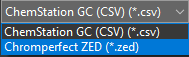
Reads Chromperfect ZED files into the Liquid GC workflow for black-oil GC analysis. The user selects the file type during load, then reviews and processes the result through the same Liquid GC controls used for CSV data.
GOR recombination
Combines gas-phase and liquid-phase compositions using a user-supplied gas-oil ratio to produce a single wellstream composition for engineering use.
Optional Phase Envelope
After recombination, an enabled KYCIS API workflow can return a P–T envelope and key phase points for engineering review.
XLSX report export
Exports a report workbook with summary, gas composition, liquid composition, recombined composition, Cn+ properties, processing log, processed input data, and metadata sheets.
Component library and aliases
Maintains a configurable petroleum component library with aliases for lab-specific names, method-specific labels, and plus-fraction conventions. Naming errors and non-standard names are common in GC exports, including spelling mistakes and shorthand labels, so GC Reader flags unknown imported names and lets the user add an alias before rerunning the import cleanly.
Alias-based component grouping
Alias rules can also roll selected imported names into a required reporting component. For example, iC5, nC5, neoC5, and cycloC5 can be grouped into a single C5 reporting line when that is the lab or client reporting basis.
Compatibility FAQ
Questions to resolve before a trial.
Does GC Reader replace ChemStation or Chromperfect?
No. The CDS remains responsible for acquisition, calibration, integration, and result acceptance. GC Reader begins with an accepted export.
Which files are supported now?
Gas GC uses ChemStation FID and TCD CSV exports. Liquid GC accepts ChemStation CSV or Chromperfect ZED. Other layouts require sample-file qualification.
Can it create a client-facing report?
Yes. GC Reader creates a standalone XLSX workbook with a concise summary and selectable supporting sheets for technical review.
How is a wellstream composition produced?
Processed gas and liquid mol% compositions are combined using the project GOR and reviewed oil-density basis, with component aliases resolved before recombination.
Can a laboratory control component names?
Yes. The component library, aliases, reporting groups, molecular weights, densities, and project-specific naming conventions remain editable.
What is required for Phase Envelope calculation?
An active KYCIS API configuration, including API Base URL and API Key, is required. Contact KYCIS for key access. The optional calculation runs from the recombined wellstream.
What is needed to qualify a workflow?
A redacted representative export, the workflow type, detector/file combination, composition basis, and desired report structure. Confidential client data is not required.
Technical specifications
Built for practical lab deployment.
| Input formats | Agilent ChemStation CSV exports for existing GC workflows; Chromperfect ZED files for black-oil Liquid GC workflows. Other GC export layouts can be reviewed during sample-file qualification. |
|---|---|
| Analysis workflows | Gas composition, liquid composition with ISD normalization, Chromperfect ZED import for Liquid GC, gas/liquid recombination by GOR, and optional Phase Envelope calculation after recombination. |
| Detector handling | FID/TCD detector merge with configurable tie component and component mapping rules. |
| Outputs | Normalized mole percent and weight percent composition tables plus XLSX report workbooks for reporting, review, and engineering handoff. When Detailed Processing Data is selected and a Phase Envelope has been calculated, the report can include a Phase_Envelope sheet. |
| Platform | Protected Windows desktop application powered by Microsoft Excel; supported Excel versions are confirmed during workflow qualification. |
| Customization | The predefined 77-component library can be edited and extended by users. Component aliases, alias-based grouping rules, molecular weights, ISD settings, report layout, and lab-specific naming conventions can be configured by project. |
Sample-file qualification
Qualify GC Reader on one representative export.
Send a redacted ChemStation CSV or Chromperfect ZED example and describe the XLSX report your laboratory needs. KYCIS will check parser fit, component naming, detector assumptions, and the required output before preparing a trial.
Include with the request
- Gas, liquid, or recombination workflow
- ChemStation CSV, Chromperfect ZED, or another export layout
- FID/TCD files and liquid normalization basis where applicable
- Required composition, lumping, and report sheets
Use redacted or non-confidential data. A representative structure is enough for compatibility review.
Receive KYCIS updates
Receive occasional product, engineering, and company updates from KYCIS. We will send a confirmation email before adding you to the list.
After submitting, check your inbox and Spam or Junk folder for the confirmation email. Add info@kycis.com to your contacts to help future updates reach your inbox.