
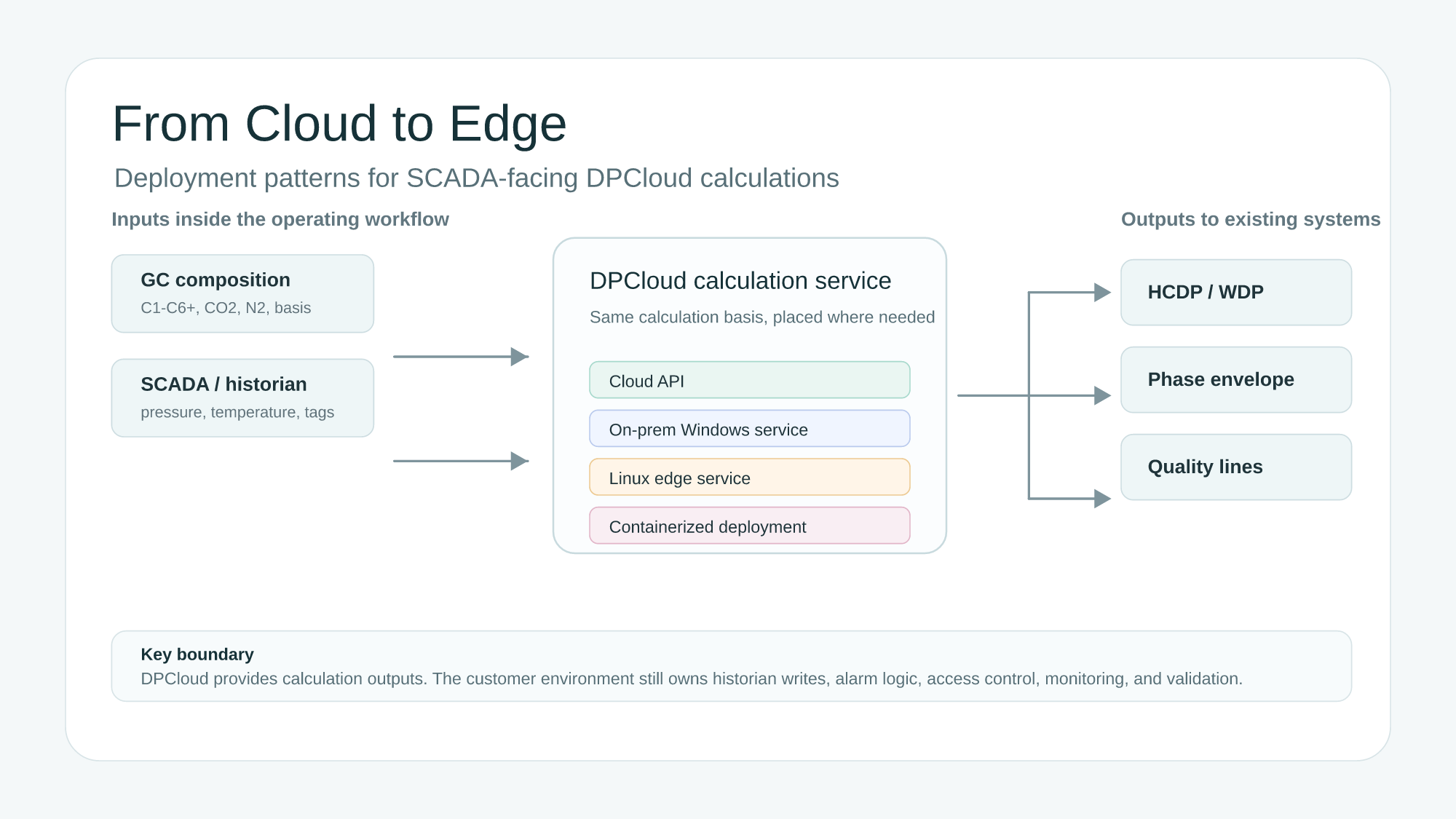
A SCADA dew point calculation is not only a thermodynamic problem. It is also a deployment problem. Pipeline operators need to know where the calculation runs, which data crosses a network boundary, who owns the service, and how the result becomes part of an operating workflow.
That is why DPCloud should not be described as a single hosting model. For some users, a cloud API is the fastest and cleanest way to evaluate hydrocarbon dew point, water dew point, phase envelopes, and quality lines. For other users, the calculation needs to sit closer to the plant network, the historian, or the SCADA-facing integration layer. In those cases, the right question is not “cloud or on-premises?” It is “which deployment pattern matches the network, security, and lifecycle constraints?”
In this article, “edge” does not mean a CDN edge or a public cloud point of presence. It means a local node inside, or adjacent to, the customer’s plant or pipeline network: a control-room server, a plant gateway, a historian-adjacent service host, or a small industrial computer managed by the customer’s IT/OT team.
DPCloud is a calculation service, not a SCADA replacement
DPCloud should be placed in the correct box. It is a calculation service for natural-gas phase behavior. It can receive gas composition, pressure, temperature, and calculation requests. It can return values such as hydrocarbon dew point, water dew point, phase-envelope points, and selected quality-line thresholds.
It is not a SCADA master. It is not a historian. It is not an alarm-management system. It should not become the owner of plant alarm philosophy, tag governance, or operator response procedures. Those responsibilities remain with the customer’s operating systems and engineering practices.
This boundary is important. A deployment can be technically successful and still operationally weak if no one owns the output tags, no one validates the input basis, or no one monitors the service after commissioning. DPCloud provides the calculation layer. The customer environment still owns the workflow around that layer.
Four deployment patterns
DPCloud deployment should be scoped around the operating environment. The same calculation basis can be exposed through different patterns, but each pattern creates a different ownership model. The table below is a practical starting point, not a universal architecture rule.
| Deployment pattern | Best-fit scenario | Typical interface | Integration style |
|---|---|---|---|
| Cloud API | Engineering screening, demos, multi-site evaluation, low-friction integration | HTTPS API | Fastest trial path, lowest local infrastructure burden |
| On-premises Windows service | Windows-heavy OT environments, control-room servers, traditional plant IT support | Local REST endpoint or service wrapper | Close to historian jobs, tag writers, and Windows operations tooling |
| Linux edge service | Gateway, plant-server, or lightweight edge-node environments | REST endpoint managed as a system service | Useful where Linux is already the preferred edge operating model |
| Containerized deployment | Multi-site rollout where the same tested image should land on multiple plants | Containerized API service | Version pinning and repeatable deployment matter more than host OS preference |
The last two patterns should be described carefully in public material. Linux and containerized deployments can be scoped for customer environments, but the right implementation depends on the target operating system, container platform, update policy, network segmentation, and support model. That distinction matters. “Can be scoped” is a better and more accurate phrase than promising universal plug-and-play support for every edge gateway.
What edge or on-premises deployment changes
Moving a dew-point calculation service closer to the plant network changes the deployment boundary. It can reduce the amount of operational data that leaves the customer’s environment. It can make the calculation endpoint easier to place beside a historian, middleware job, or tag writer. It can also give the customer more control over update windows, endpoint exposure, and local monitoring.
For some operators, this is the main reason to consider an on-premises dew point calculation workflow or an edge dew point calculation pattern. Gas composition may be treated as sensitive operating data. SCADA tags may be restricted to internal networks. A plant may have a standard approach for local services, service accounts, and change management. In those cases, deployment location becomes part of the engineering requirement.
Edge deployment can also support semi-connected workflows. A site may want local calculations to continue during a WAN outage, or it may want to batch data to a central system while keeping the operating calculation local. Whether that is appropriate depends on the customer’s network design and lifecycle ownership. DPCloud should be scoped to fit that environment rather than force a single architecture.
What deployment location does not change
Running a calculation at the edge does not make the result more accurate by itself. Accuracy still depends on the calculation basis and the inputs. Gas composition, C6+ handling, pressure reference, temperature basis, units, binary interaction parameters, and the chosen calculation mode still matter.
Deployment also does not replace validation. Before a calculated value becomes part of an alarm or operating limit, teams should compare it against known cases, lab measurements, or previously reviewed engineering calculations. The KYCIS article on validating DPCloud against lab-measured dew points explains why agreement should be interpreted by bias, scatter, composition basis, pressure basis, and operating regime rather than by a single pass-fail number.
Finally, deployment location does not remove the need for service ownership. A local service still needs logs, health checks, credential management, update discipline, backup planning, and rollback procedures. A container still needs image version control and runtime ownership. A Windows service still needs a service account and a patching policy. A cloud API still needs timeout and retry behavior in the calling application.
Deployment checklist for SCADA-facing calculations
The checklist below is written for SCADA-facing dew-point calculations, but the same logic applies to phase-envelope and quality-line workflows. Each item is a decision that should be made before the calculation is treated as operational.
Target host and operating model
Decide where the calculation will run and who owns the host. Is it a cloud API integration, a Windows server service, a Linux edge node, or a container platform? The answer should match the customer’s support model, not only the developer’s preference.
Endpoint policy
Define who can call the calculation endpoint. Is it localhost only, a plant subnet, a DMZ service, or a controlled application account? The endpoint policy should match the SCADA or historian network policy and the customer’s cybersecurity expectations. A calculation endpoint should not be exposed broadly just because it is convenient during testing.
Service account and secrets
Use the least privilege that works. A service account should have only the access needed to run the calculation service and interact with approved local resources. API keys, certificates, and credentials should not be embedded in scripts, screenshots, or operator-facing logs.
Input tag mapping
Map every input explicitly: gas composition source, composition timestamp, pressure, temperature, water content if used, pressure units, temperature units, and component basis. If a GC update is late or a composition is flagged invalid, the calling workflow should know whether to hold the previous result, skip the calculation, or raise a data-quality alarm.
Output tag ownership
Decide where outputs go and who owns them. HCDP, WDP, phase-envelope status, or quality-line margin may become historian tags, dashboard values, or alarm inputs. Each output should have a tag name, unit, update frequency, quality flag, and owner. If the result is used for an alarm, the alarm owner must be clear.
Schedule, timeout, retry, and fallback
A calculation service should be fast, but production reliability is more than raw speed. Define the expected scan interval, timeout, retry count, and fallback behavior. If a calculation fails, should the output go stale, hold last value, write a bad-quality flag, or trigger an integration alarm? That decision belongs in the design, not in an incident review.
Logging and health checks
Logs should help support the service without leaking unnecessary operating detail. Record request status, calculation mode, timing, error category, and version where useful. Avoid logging credentials. Decide whether full gas compositions belong in logs before the service is commissioned. Add a health check that can be monitored by existing IT/OT tooling.
Version and update control
Every deployment pattern needs version discipline. A containerized deployment should pin image versions. A Windows or Linux service should have a documented service version and rollback path. A cloud API integration should document API version expectations and client timeout behavior. Change windows should be coordinated with operations.
Validation before alarm use
Do not turn a new calculated value into an alarm basis on day one without validation. Use known gas cases, historical GC data, reviewed engineering calculations, or lab comparisons. Confirm units, composition basis, pressure reference, C6+ split, and the calculation mode. The first production goal should be trusted visibility, then alarm design.
How to choose the right deployment pattern
Choose the cloud API when speed of trial matters. It is usually the best path for engineering screening, early evaluation, demos, and workflows where the data policy allows an external API call. It also works well when a central engineering team wants to evaluate multiple cases without commissioning local infrastructure at each site. The DPCloud live demo is built around this low-friction evaluation idea.
Choose an on-premises Windows service when the OT environment is Windows-heavy and the customer’s support team already manages Windows services, scheduled tasks, and local integration jobs. This can be a practical fit for historian-adjacent calculation services, plant servers, and controlled internal networks where Windows is the standard operating model.
Choose a Linux edge service when the site already uses Linux for gateways, edge nodes, or plant servers. This pattern can be appropriate where a lightweight local service is preferred, where the integration layer is already Linux-based, or where the customer wants service management through Linux operations tooling. The deployment still needs the same endpoint policy, secrets management, logging, and validation discipline as any other local service.
Choose containerized deployment when repeatability matters more than manual server setup. Containers can help pin versions, standardize runtime dependencies, and support multi-site rollout discipline. However, a container is not a deployment strategy by itself. The customer still needs to decide who owns the image, runtime, network policy, persistent configuration, secrets, logs, update cadence, and rollback.
Choose air-gapped or highly restricted scoping only when lifecycle ownership is clear. A disconnected deployment can reduce external dependencies, but it increases responsibility for updates, support handoff, version tracking, and incident response. In many cases, a controlled on-premises service or semi-connected edge service is a better operating compromise than a fully isolated deployment.
Common deployment mistakes
The first mistake is treating the calculation service as the alarm system. DPCloud can provide calculated values and margins, but alarm ownership, alarm priority, operator response, and suppression logic belong in the customer’s operating environment.
The second mistake is exposing an internal endpoint too broadly. During a pilot, it is tempting to open access so that every test client can call the service. Production should be tighter. Access should be limited to the approved integration layer, host, subnet, or application identity.
The third mistake is skipping unit and basis validation. Dew-point values are sensitive to pressure reference, temperature units, composition basis, heavy-end handling, and equation-of-state assumptions. A deployment that moves data correctly can still produce misleading results if the basis is wrong.
The fourth mistake is logging too much. Support logs are useful, but they should be designed. Do not assume that full compositions, credentials, or raw payloads belong in long-lived logs. Decide what is needed for support and what should remain outside routine log storage.
The fifth mistake is carrying pilot behavior into production without a smoke test. A pilot may use relaxed endpoint access, short timeout values, informal retry behavior, or manual recovery steps. Before alarm integration, run a production-style smoke test that confirms endpoint access, response timing, bad-input behavior, stale-data handling, logging, restart behavior, and output tag quality flags.
Where this fits in the DPCloud product story
DPCloud’s technical story has several layers. The latency engineering article explains why calculation speed and numerical robustness matter. The validation article explains how calculated dew points should be compared against measured data. The quality-lines article explains why liquid-yield thresholds can matter more than first liquid onset in some operating decisions.
W8 adds the deployment layer. It answers a different buyer question: can this calculation service fit the architecture we actually run? For some teams, the answer is a cloud API. For others, it may be an on-premises Windows service, a Linux edge service, or a containerized deployment scoped to the customer’s environment.
The product value is not tied to a single hosting location. The value is that a consistent calculation basis can be placed where the operating workflow needs it, then validated, monitored, and governed by the customer’s normal IT/OT process.
Getting started
If your team is evaluating a SCADA dew point calculation workflow, start with the deployment constraints. Share the target environment, operating system preference, network policy, container platform if any, historian or SCADA interface, calculation tags, expected update frequency, and validation basis. KYCIS can help scope whether DPCloud should be used as a cloud API, on-premises Windows service, Linux edge service, or containerized calculation service.
For product background, see the DPCloud product page. For a browser-based evaluation workflow, try the DPCloud live demo. For deployment scoping, contact KYCIS with your target architecture and calculation workflow.
Related KYCIS resources
- DPCloud: Real-Time Hydrocarbon and Water Dew Point Calculations.
- DPCloud Live Demo.
- Sub-150 ms Dew Point Calculations: How DPCloud Combines Speed With Numerical Robustness.
- Validating DPCloud Against Lab-Measured Dew Points: What Agreement Really Means.
- Quality Lines vs Hydrocarbon Dew Point: When “How Much Liquid” Matters More Than “Whether Liquid Starts”.